
The Business Case for an AI Security Engineer
Most engineering teams don't have a scanning problem. Semgrep, Trivy, Gitleaks, and Checkov are mature, widely adopted, and genuinely good at finding vulnerabilities. What they don't do is tell you which of the findings they surfaced this week will actually get someone breached — and none of them will write, apply, or verify the fix for you.
That gap between "found" and "fixed" is where most of the real business risk sits. A finding sitting unaddressed in a backlog provides zero protection, no matter how good the scanner that found it was. Below is a walkthrough of how our AI Security Engineer closes that gap, using screenshots straight from the live product.
Why More Scanners Isn't the Answer
Adding another scanner to the stack multiplies noise faster than it multiplies coverage. Each tool has its own severity scale, its own dashboard, and its own idea of what's critical — so a security team running four scanners often ends up reconciling four disconnected spreadsheets before anyone can even start triage. Engineers, understandably, start tuning out reports that don't map cleanly to "is this urgent or not."
This is exactly the problem our AI Security Engineer was built to solve. It doesn't replace Semgrep, Trivy, Gitleaks, or Checkov — it sits on top of them, consolidating every finding into one unified view, then uses AI to evaluate what genuinely matters based on risk score, business impact, and real-world exploitability.
The Dashboard: One Score, Not Four Reports
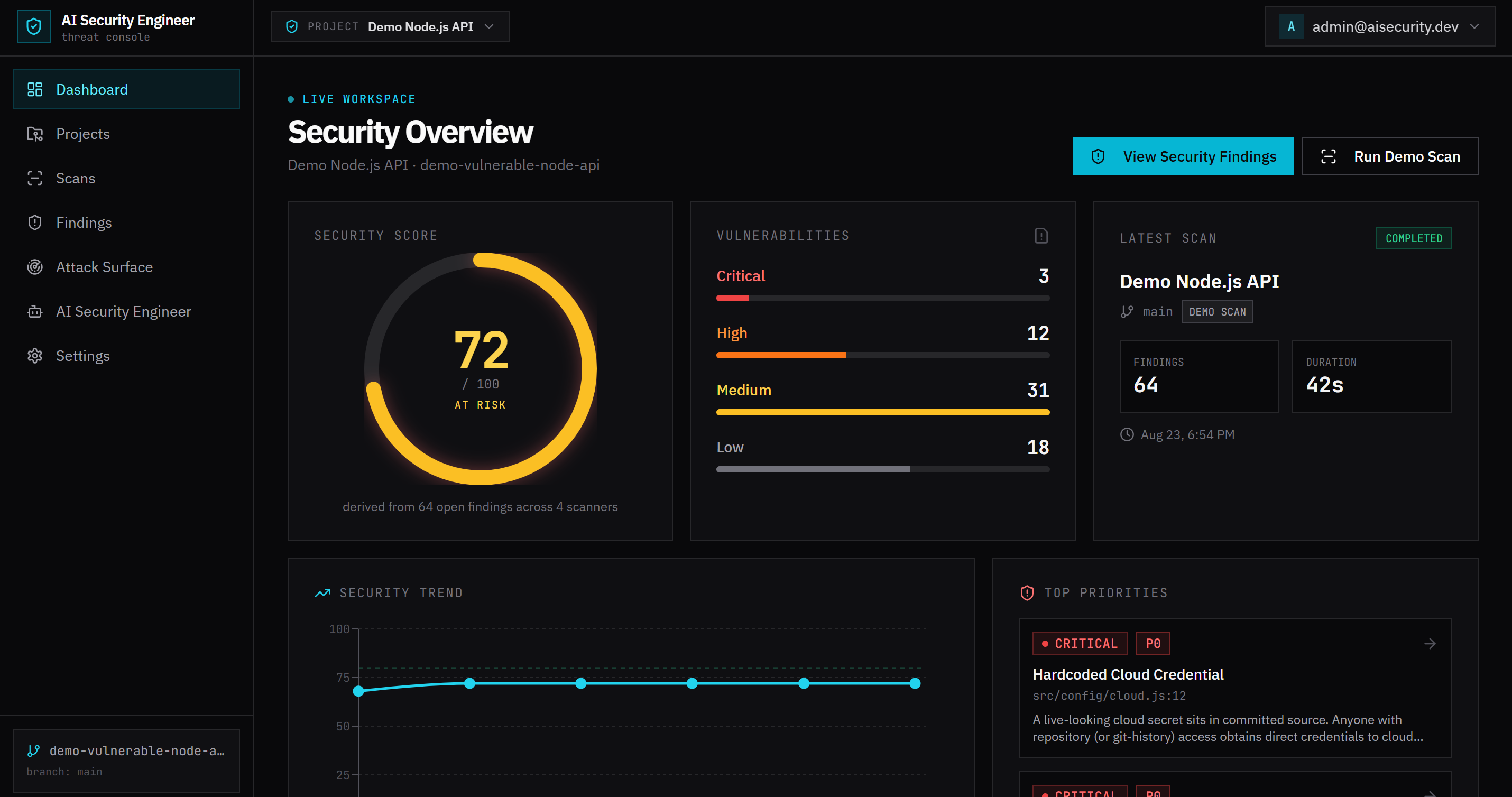
This is the actual dashboard from one of our demo projects, a deliberately vulnerable Node.js API. Instead of four scanner outputs to reconcile, there's a single Security Score (72/100 here, flagged "at risk"), derived from every open finding across all four scanners. The breakdown underneath — 3 critical, 12 high, 31 medium, 18 low — is the same data Semgrep, Trivy, Gitleaks and Checkov produced individually, just normalized into one view.
The Security Trend chart on the same screen is what most teams are missing entirely today: a running history of the score across every scan, so "are we getting safer or worse" is a glance, not a spreadsheet exercise. The Top Priorities panel — leading with a hardcoded cloud credential in this case — is the AI's ranked answer to "what should someone fix today," not just a list sorted by scanner-assigned severity.
Findings: Every Scanner's Output, One AI Priority Column
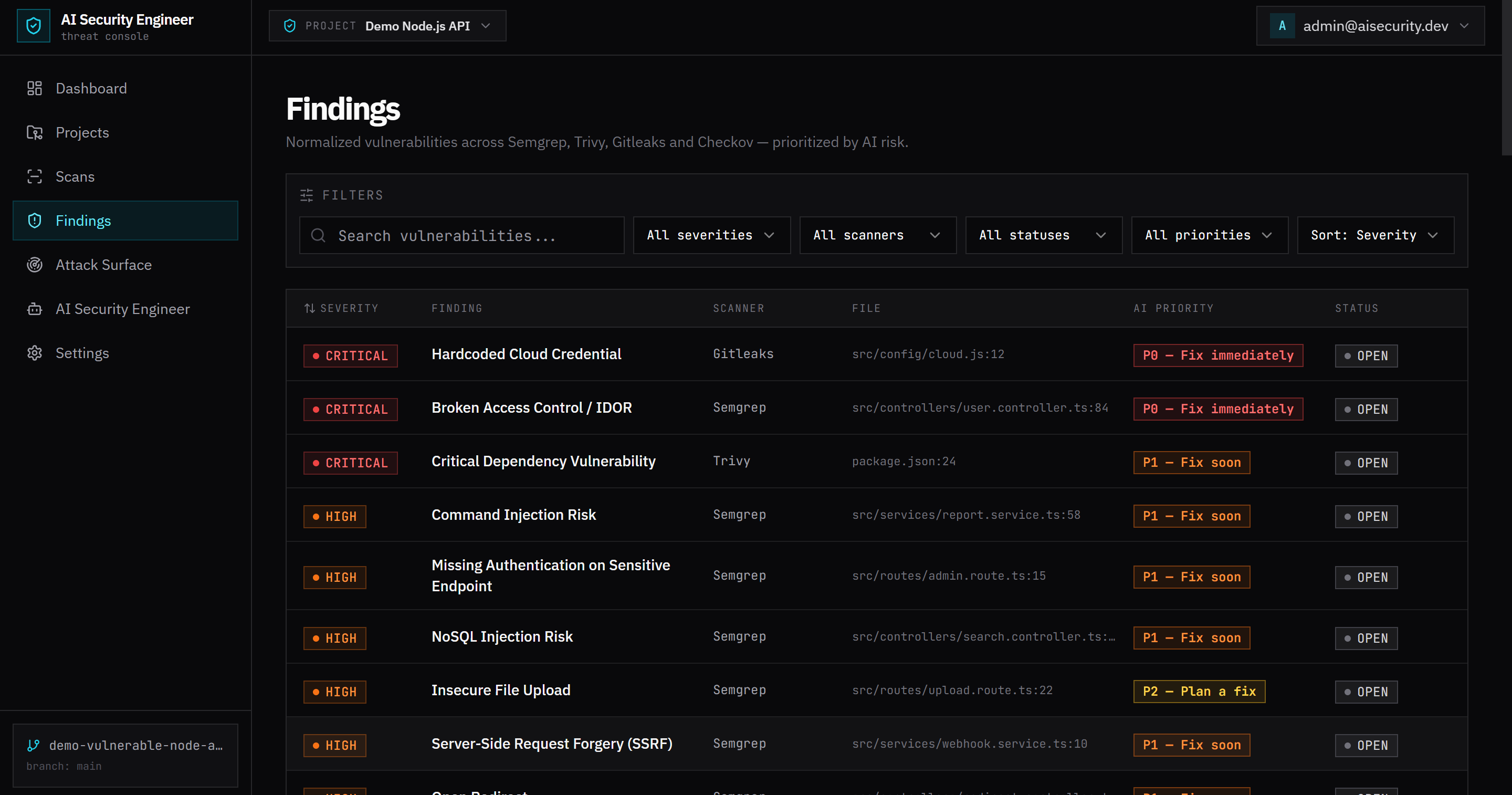
The Findings view is where the reconciliation problem actually gets solved. Every row carries the scanner that raised it (Semgrep, Trivy, Gitleaks, Checkov), the exact file and line, and — critically — an AI Priority independent of the scanner's own severity label: P0 for fix-immediately issues like a hardcoded cloud credential or a broken-access-control bug, down to P2 for lower-urgency cleanup. Filters for severity, scanner, status and priority mean a team can work the list as "everything P0 across all tools" instead of tool by tool.
Inside a Finding: Why It Matters, Not Just What It Is
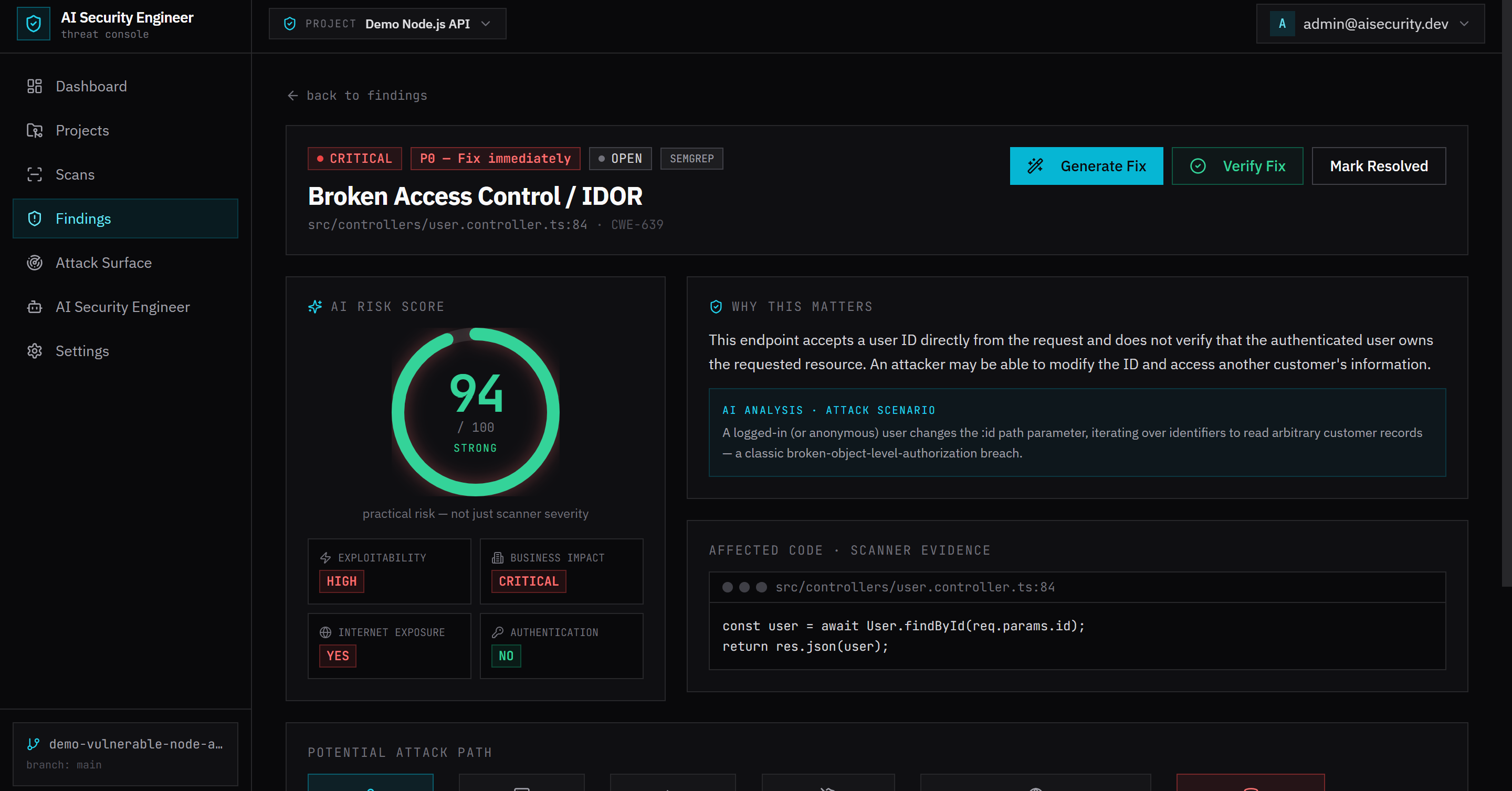
Opening any single finding — here, a Broken Access Control / IDOR issue in a user controller — shows what a raw scanner alert never does: exploitability, business impact, and whether the endpoint is exposed to the internet, plus a plain-language "Why This Matters" explanation and an AI-written attack scenario describing exactly how the flaw would be abused (in this case, an attacker iterating over the `:id` path parameter to read other customers' records). The vulnerable code itself is shown inline, next to the file and line it lives at.
This is also where the loop closes. "Generate Fix" produces concrete remediation code for the finding; "Verify Fix" re-runs the relevant scan to confirm the vulnerability is actually gone rather than just marked resolved by a human who assumed the patch worked. "Mark Resolved" is the last step, not the first — the fix has to prove itself against a fresh scan before the finding leaves the open list.
Scans: A Repeatable Pipeline, Not a One-Time Report
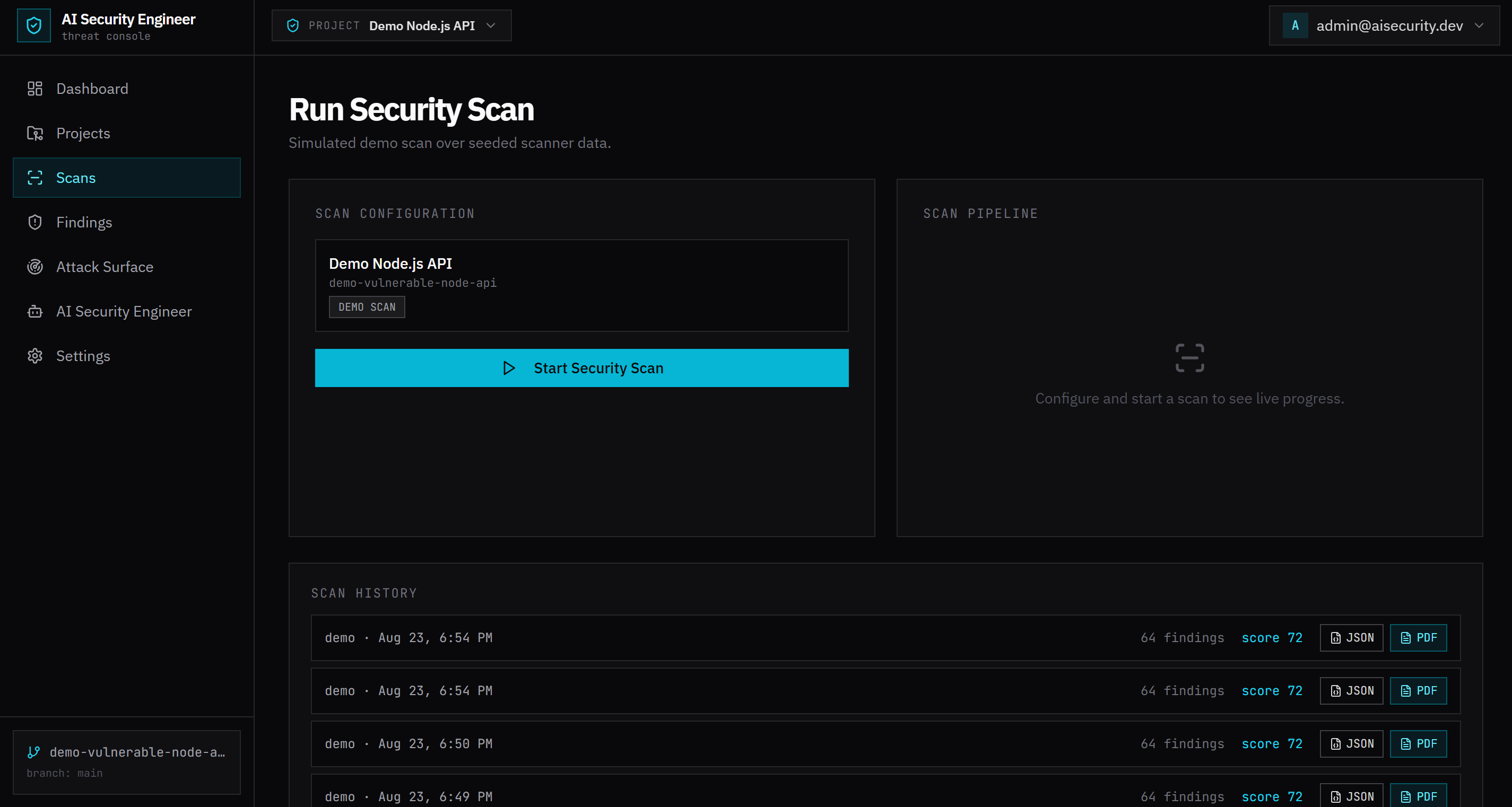
Security testing that only runs once before launch stops protecting you the day after launch. The Scans page treats a scan as a repeatable, one-click pipeline rather than a one-off report: configure the target, run it, and watch the pipeline execute live. Scan History keeps every run — score, finding count, and duration — with JSON and PDF export for teams that need an audit trail or a report to hand to a customer's security questionnaire.
Ask Your Security Engineer: Grounded, Not Generic
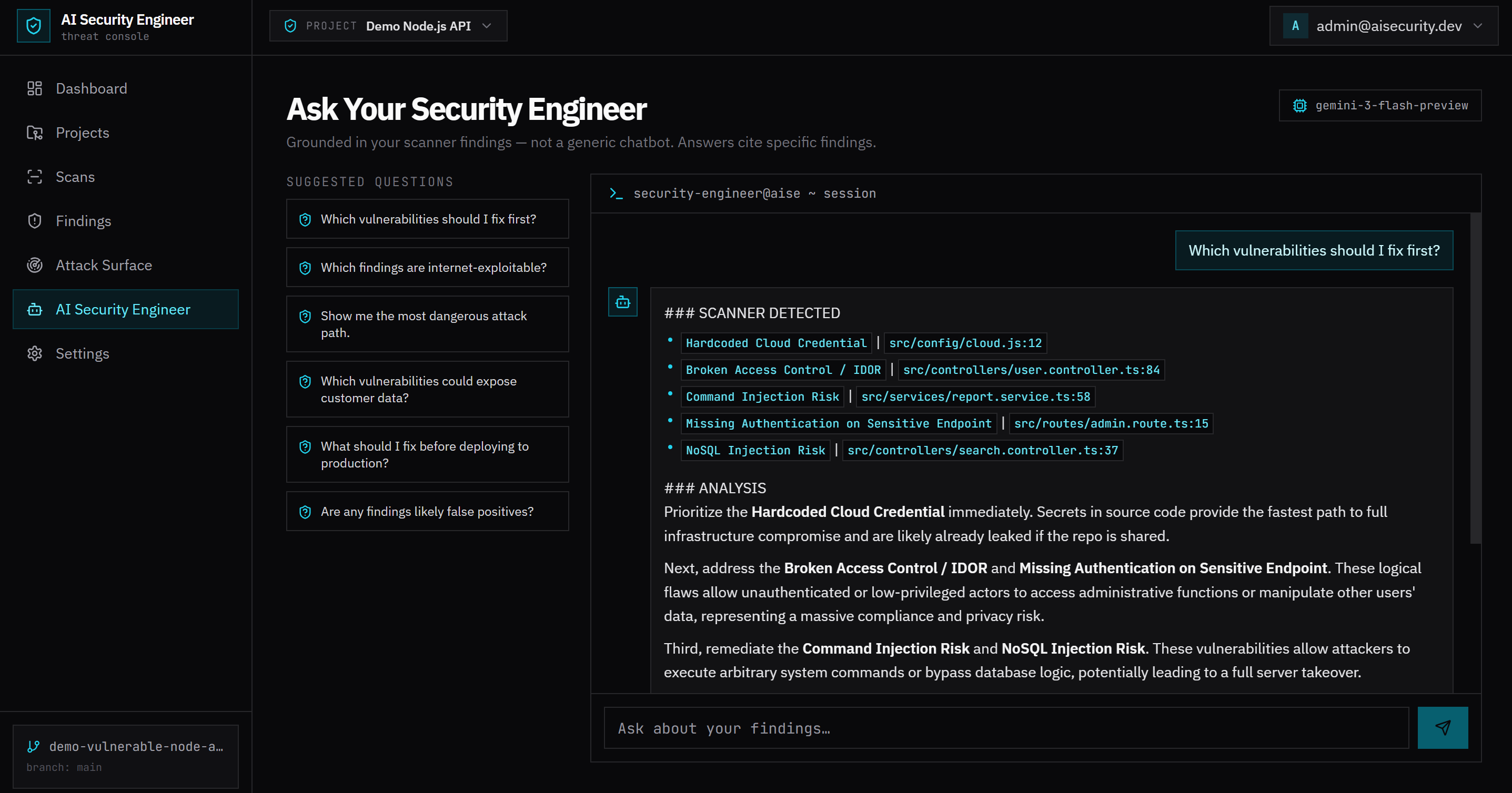
The last piece is a chat interface that answers questions against your real scan data instead of general security advice. Asked "Which vulnerabilities should I fix first?", it doesn't say "prioritize critical issues" — it names the hardcoded cloud credential, the broken access control bug, and the injection risks specifically, cites the file and line for each, and explains why that order makes sense (a leaked secret is the fastest path to full compromise; access-control and injection flaws follow because of their blast radius). Suggested prompts like "What should I fix before deploying to production?" and "Are any findings likely false positives?" cover the questions a security-minded engineer would actually ask.
The Business Case, in Plain Terms
For a growing engineering team, hiring a dedicated security engineer is expensive and the talent is scarce; for a small team, it's often not justifiable at all until after an incident forces the conversation. An AI Security Engineer doesn't remove the need for security judgment, but it compresses the loop — from a pile of unranked scanner output to a short list of verified, closed issues — down to something a general engineering team can run continuously, sprint after sprint, without a specialist gating every finding.
That's the actual ROI: not "more vulnerabilities found," but fewer vulnerabilities sitting open, for less engineering time spent triaging noise. The MVP shown above is live today — if you'd like to see it against your own stack, request a demo and we'll walk through a scan on a codebase you choose.